Last Updated on: May 14, 2026
Contents
Server-side conversion tracking loses value when events lack browser context. Ad platforms like Meta, LinkedIn, and Reddit need identifiers, cookies, user agent, screen data, to match conversions to users. Without that context, Event Match Quality drops and campaign optimization suffers. This guide covers how we enriched HubSpot Contact records with client-side data to send higher-quality server-side conversion events and significantly improve ad platform match rates.
Key Takeaways
- Server-side conversion tracking fails without browser context: ad platforms need _fbp, _fbc, user agent, and screen data to match conversions to users.
- GTM captures browser identifiers at form submission and stores them as HubSpot Contact properties for use in downstream workflows.
- HubSpot lifecycle stage workflows forward enriched browser context to Meta CAPI, LinkedIn Conversions API, and Reddit Conversions API.
- Form-based and event-based enrichment approaches have different tradeoffs — form-based is simpler; event-based captures all conversion types.
- This enrichment pipeline is more privacy-resilient than pixel-only tracking as Safari ITP and ad blockers tighten client-side data collection.
How HubSpot Lifecycle Enrichment Improves Ad Match Rates
Server-side conversion events lack critical browser context, ad platform identifiers, user agent, screen dimensions, that unlock high match rates. We solved this by enriching HubSpot Contacts with client-side data before lifecycle transitions, then sending that context forward to Meta CAPI, LinkedIn Conversions API, and Reddit. The result: significantly higher match rates and more reliable optimization tied to qualified pipeline outcomes, not just on-site activity. In this post, you’ll learn:
- Why server-side conversions fail without browser context
- The architectural decision between form-based and event-based enrichment
- How to capture and attach browser identifiers to HubSpot Contacts using GTM
- How enriched lifecycle events improve ad platform match rates and campaign performance
- Why this approach scales better than pixel-only tracking in a privacy-constrained environment
Why Server-Side Conversions Fail Without Browser Context
Server-side conversion events let you optimize on actions that don’t happen in the browser. Some of the most valuable signals, lifecycle changes, qualified leads, revenue, occur after the initial session.
If those events aren’t sent back to ad platforms, optimization is limited to surface-level activity. We had a specific use case.
When a HubSpot Contact moves through lifecycle stages, we wanted to send ad platforms conversion events. Those events needed to include browser context and ad platform match identifiers for optimal match rates.
This unlocks very high match rates in ad campaigns, on behavior that identifies a highly qualified ad target. Richer data to Meta, LinkedIn, and Reddit means conversions matched more accurately and campaign performance improved everywhere. We were already triggering server-side conversion events when a HubSpot Contact entered specific lifecycle stages. Those events lacked critical browser-level context:
- User agent
- Facebook _fbp
- Facebook _fbc
- Reddit Click ID (rdt_cid)
- Reddit UUID (rdt_uuid)
- Screen width
- Screen height
Without these identifiers, match quality in ad platforms suffers. The challenge: How do we reliably capture client-side browser context and attach it to HubSpot Contacts so it’s available later when lifecycle events fire server-side?
Two Approaches to Enrich Browser Context: Form-Based vs. Event-Based
We evaluated two approaches for getting browser context into HubSpot.
Form-Based
Create Contact properties, add hidden fields to forms, and populate them with JavaScript. When a form is submitted, the data is written directly to the Contact record.
Event-Based
Capture the same data in Segment and use a HubSpot Actions destination to upsert Contact properties in real time, bypassing forms entirely.
Our Pick
Both approaches work. We chose the form-based route. It kept our CDP layer simpler and leaned on native HubSpot behavior, even if it meant updating forms.
Comparison
| Factor | Form-Based | Event-Based |
|---|---|---|
| Complexity | Lower, native HubSpot | Higher, requires CDP maturity |
| Form dependency | Requires form submissions | Captures all sessions |
| CDP load | Minimal | Heavier upsert traffic |
| Best for | Lead-gen sites with forms | Product-led, event-heavy stacks |
What We Captured (and What We Didn’t)
We focused only on browser-accessible data that improves match rates:
- User agent
- _fbp and _fbc
- Reddit identifiers (rdt_cid, rdt_uuid)
- Screen dimensions
We avoided anything not reliably available client-side or unlikely to improve match quality, like IP address. That constraint kept the implementation clean and privacy-conscious. If it doesn’t improve match rates, it’s not worth collecting.
Implementation
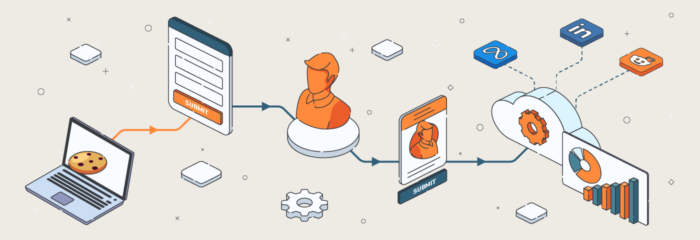
We used Google Tag Manager to capture key browser context and made those values available to both HubSpot forms and Segment events.
Step 1: Capture Browser Context in GTM
We set up GTM variables for cookies, user agent, and screen size. Those values were made available to both HubSpot forms and Segment events.
Step 2: Create Matching Contact Properties in HubSpot
On the HubSpot side, we created Contact properties matching each browser identifier. These properties serve as the durable storage layer for match context.
Step 3: Add Hidden Fields to Lead Forms
We added hidden fields to all lead forms, mapped to the new Contact properties. We leveraged the HubSpot forms API to populate those hidden fields with GTM values.
Step 4: Write to Contact Record on Form Submission
When a form was submitted, the browser context values were written directly to the Contact record.
Step 5: Send Enriched Data on Lifecycle Transitions
We updated our lifecycle workflows. When a Contact moved stages, a webhook sent the enriched data through Segment to ad platforms like Meta, LinkedIn, and Reddit.
Match Rate Results: Before and After Enrichment
By attaching browser context to server-side conversion events, we saw a significant lift in match rates across ad platforms. Before enrichment: Events struggled with low match quality. After enrichment: Those same events started resolving at a much higher rate. That improvement had a direct impact on optimization:
- Ad platforms now associate downstream conversions with actual users and campaigns, not partial signals
- Audience targeting improved
- Optimization became more reliable
- Performance aligned more closely with real pipeline outcomes, not just on-site activity
Why Server-Side Enrichment Scales Better Than Pixel Tracking
Server-side conversions are more than moving event firing off the browser. As we covered in our guide on using AI to find funnel leaks, having reliable data across your stack is the foundation of performance. They’re about maintaining accurate attribution in a privacy-constrained ecosystem—especially important as Safari ITP and ad blockers continue to limit client-side data collection. Without browser context:
- Match rates drop
- Optimization weakens
- Campaign performance suffers over time
By enriching Contacts early and carrying context forward into lifecycle events, we created a durable, scalable attribution pipeline. This pipeline fits into a broader MarTech stack audit strategy. This pipeline supports:
- Meta’s Conversions API (CAPI)
- LinkedIn’s Conversions API
- Reddit’s Conversion API
- Analytics reporting across the stack
Most guides focus on CAPI setup mechanics. The real leverage is upstream: which architectural decisions unlock match rate gains, what data actually matters, and how to scale it without over-collecting.
Frequently Asked Questions
What is server-side conversion tracking?
Server-side conversion tracking sends conversion events directly from your server to ad platforms, instead of relying on browser-based pixels. It improves data accuracy, bypasses ad blockers, and supports events that happen after the browser session ends, like lifecycle changes in a CRM.
How does Meta CAPI improve match rates?
Meta’s Conversions API (CAPI) improves match rates by letting you send richer customer data, like hashed email, phone, and browser identifiers (_fbp, _fbc), directly from your server. More data points mean Meta can match conversions to users more accurately, which improves Event Match Quality and ad optimization.
What browser context data improves conversion match quality?
The highest-impact browser context for match quality includes: user agent, Facebook _fbp and _fbc cookies, Reddit identifiers (rdt_cid, rdt_uuid), and screen dimensions. These identifiers let ad platforms match server-side events back to specific users with high confidence.
What is Event Match Quality (EMQ)?
Event Match Quality (EMQ) is Meta’s score for how well conversion events are matched to Facebook users. Higher EMQ means better audience targeting, more accurate attribution, and stronger ad optimization. Adding customer information parameters like _fbp, _fbc, email, and phone increases EMQ.
How do you implement enhanced conversions?
Enhanced conversions work by sending first-party customer data (email, phone, address) alongside conversion events to ad platforms. Implement via GTM with hashed parameters, through your CDP, or with the platform’s SDK. The critical piece is capturing the data client-side and attaching it to server-side events.
What’s the difference between CAPI and pixel tracking?
Pixel tracking fires events from the browser and is vulnerable to ad blockers, iOS restrictions, and cookie limits. CAPI sends events server-to-server, bypassing browser restrictions and enabling tracking of events that happen outside the browser, like CRM lifecycle changes. Most modern stacks run both for redundancy.
How do you improve conversion match rates for Google Ads?
Improve Google Ads match rates through Enhanced Conversions, which adds hashed first-party data (email, phone, name, address) to conversion events. Implement via GTM, the Google Ads tag, or server-side via the Google Ads API. Combine with offline conversion imports for full-funnel attribution.
Ready to Improve Your Match Rates?
This post was written by Joel Hatmaker, McGaw’s analytics implementation specialist with expertise in server-side tracking, ad platform integration, and HubSpot enrichment workflows.
At McGaw.io, Dan McGaw and the team build end-to-end attribution pipelines for marketing teams that need reliable data, not just dashboards. See our services or get in touch to discuss your stack.


Leave a Reply